





































The Ultimate Guide to IG Repost Apps: Unlocking the Power of Social Sharing
In the ever-evolving landscape of social media, gaining traction and engagement on platforms like Instagram is paramount for users and businesses alike. One of the simplest yet most effective ways to enhance your Instagram experience is by utilizing an ig repost app. In this article, we will delve into what IG repost apps are, how they function, the benefits they offer, and the top apps available for Instagram reposting.
What is an IG Repost App?
IG repost apps are tools that allow users to easily share other people’s posts on their own Instagram profiles while giving credit to the original content creators. This feature is particularly useful for brands, influencers, and everyday users who want to share relevant content that resonates with their audience. Instead of taking screenshots or writing captions that mention the original poster, repost apps simplify the process, making sharing seamless.
How Do IG Repost Apps Work?
The general functionality of IG repost apps typically involves the following steps:
- Choose the Content: Find the post you wish to share on Instagram.
- Copy the Link: Tap on the three dots in the top right corner of the post and select “Copy Link.”
- Open the Repost App: Launch the IG repost app you have downloaded.
- Paste the Link: The app automatically recognizes the copied link and retrieves the post details.
- Customize Your Post: Some apps allow you to add captions or change the appearance of the repost.
- Share on Instagram: Finally, share the post on your own Instagram feed or story.
Benefits of Using IG Repost Apps
The benefits of IG repost apps are numerous and can significantly impact your Instagram strategy. Here are some of the key advantages:
1. Simplified Sharing Process
By eliminating the cumbersome task of taking screenshots, cropping images, and composing attributions, repost apps make sharing content straightforward and efficient.
2. Increased Engagement
Sharing relevant and intriguing content can help capture the attention of your audience and increase your engagement levels. Reposting valuable posts from others can also encourage them to engage with your profile, leading to potential collaborations.
3. Showcasing Community and Authenticity
Reposting content from other users shows that you appreciate their work and value community interaction. This kind of engagement can help build relationships and foster a sense of authenticity on your profile.
4. Content Curation
Using a repost app enables you to curate content that aligns with your brand and resonates with your audience. This added layer of thoughtful sharing can enhance your overall content strategy.
Top IG Repost Apps
Several IG repost apps are available in app stores, each offering unique features and functionalities. Here are some of the top-rated repost apps currently available:
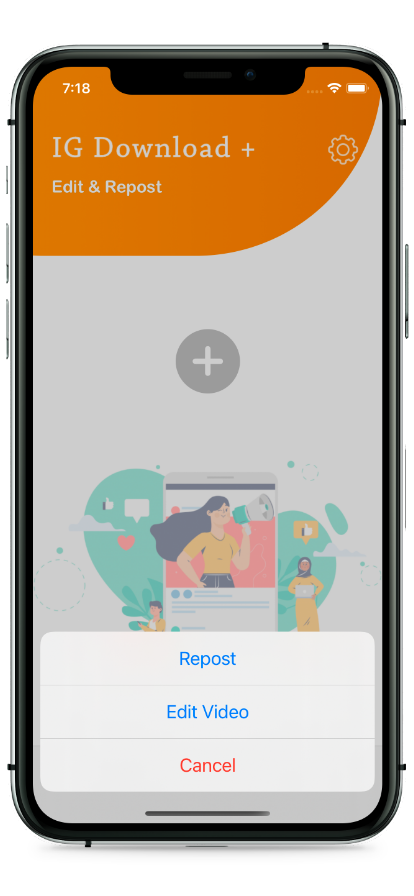
1. Repost for Instagram
This app is one of the most popular options for reposting on Instagram. It provides a simple interface and options to customize captions, making it a favorite among users.
2. Regrammer
Regrammer stands out for its no-nonsense design and easy functionality. You can repost videos and photos seamlessly while ensuring credit is given to original users.
3. Repost Post for Instagram
This app offers a plethora of features, including the ability to save posts for future reposting and customizing the appearance of shared content.
4. InstaRepost
InstaRepost is known for its user-friendly interface, enabling quick reposting of photos and videos. It also lets users save reposted content in collections for easy access.
5. RepostMe
The RepostMe app stands out with its ability to repost comments directly along with the content, making it a unique choice for engagement.
Best Practices for Reposting on Instagram
While using IG repost apps can streamline the sharing process, it’s important to follow best practices to ensure respectful and effective reposting:
1. Always Credit the Original Content Creator
Ensure that the original creator’s username is clearly visible in your repost, showing courtesy and respect for their work.
2. Seek Permission When Necessary
If the content is from a less known user or if you plan to use it for commercial purposes, it’s best to ask for permission before reposting.
3. Add Your Unique Touch
Don’t forget to add your thoughts, commentary, or additional context to the reposted content to make it your own and engage your audience.
4. Monitor Engagement
After reposting, keep an eye on how your audience responds. This can help you understand what type of content resonates best with them in the future.
Conclusion
In the era of content sharing, IG repost apps have emerged as essential tools for anyone looking to amplify their Instagram presence. By simplifying the content sharing process and enabling users to share engaging material, these apps open the door to greater engagement, community-building, and brand authenticity. As you explore the different options available, remember to utilize best practices to ensure respectful and engaging reposting. Start leveraging the power of IG repost apps today and elevate your social media strategy to new heights!